
Torrents-Tracker is a Django-based web application that provides a unified interface for searching and downloading torrents through popular indexing services such as The Pirate Bay. It runs behind a ProtonVPN tunnel so all torrent traffic and searches exit through an encrypted VPN connection — your real IP is never exposed to trackers or indexers.
The app integrates directly with a local Transmission daemon for download management, allowing you to add, monitor, and export transfers without leaving the browser.
Pages
Home — Search
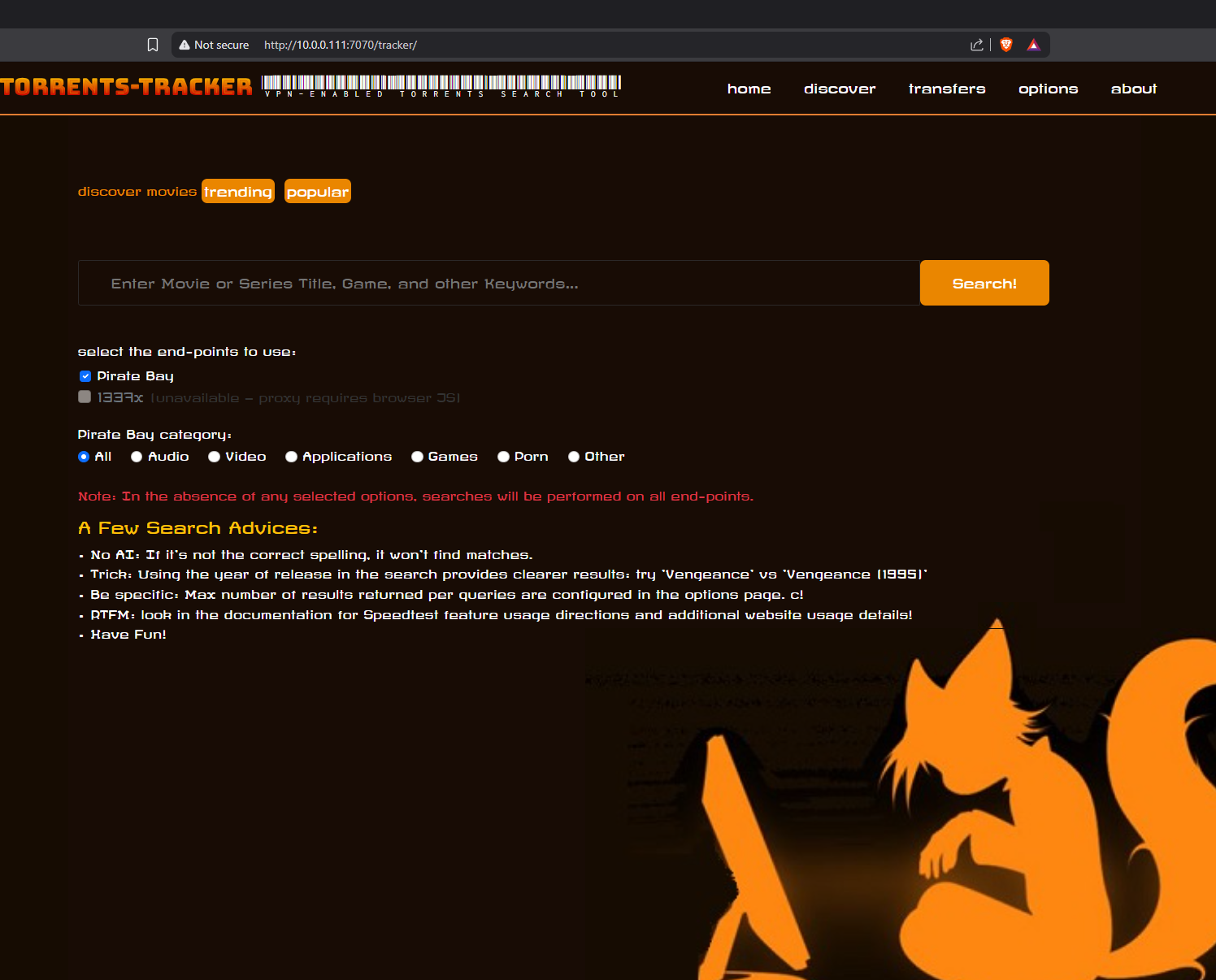
The home page is the main search interface. Enter any movie title, series name, game, or keyword in the search bar and hit Search!.
End-point selection lets you choose which indexers to query:
- Pirate Bay — enabled by default, queries the configured Pirate Bay proxy endpoint.
- 1337x — currently unavailable; proxies for this site require browser-side JavaScript execution that a server-side scraper cannot perform.
Pirate Bay category filter narrows results to: All, Audio, Video, Applications, Games, Porn, or Other.
A few search tips are displayed below the form:
- Spelling matters — there is no fuzzy/AI matching; if the title is wrong, no results come back.
- Including the release year significantly improves result accuracy (e.g.
Vengeance (1995)vsVengeance). - The maximum number of results returned per query is configurable on the Options page.
Discover

The Discover page surfaces Trending and Popular movies fetched from an external metadata source, displayed as a poster grid. Each card shows the title, year, and a thumbnail poster.
Toggle between trending and popular using the pill buttons at the top. Clicking a poster takes you to more details or initiates a search for that title.
Transfers
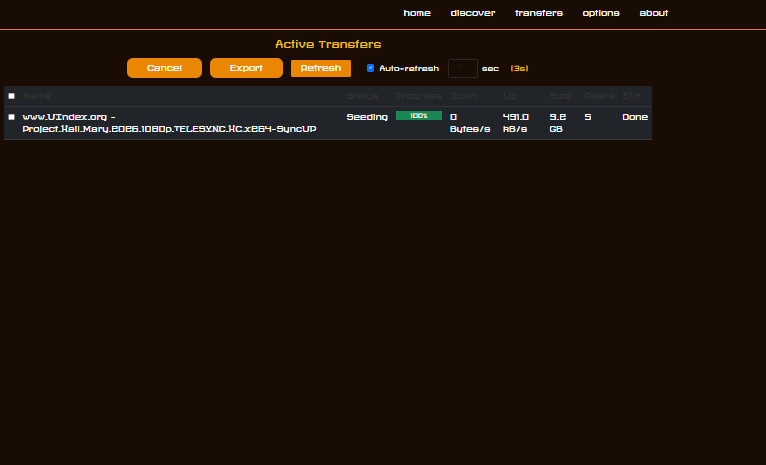
The Transfers page shows all active and completed downloads managed by the local Transmission daemon. It queries the Transmission RPC endpoint and displays a live table with the following columns:
| Column | Description |
|---|---|
| Name | Torrent filename / release name |
| Status | Current state (Downloading, Seeding, Paused, etc.) |
| Progress | Visual progress bar + percentage |
| Down | Current download speed |
| Up | Current upload speed |
| Size | Total torrent size |
| Peers | Number of connected peers |
| ETA | Estimated time to completion |
Actions (row checkboxes + header select-all):
- Cancel — removes selected torrents from Transmission (downloaded files are kept on disk).
- Export — moves completed torrents from the Transfers directory to the
/mnt/datassd/Nouveautesexport folder, then removes them from Transmission. Incomplete torrents are skipped with a warning message. - Refresh — manually reloads the table.
- Auto-refresh — enable the checkbox and set an interval (seconds, minimum 3) to have the page refresh automatically. A countdown is shown next to the controls. This setting is persisted in
localStorageso it survives page reloads.
Options
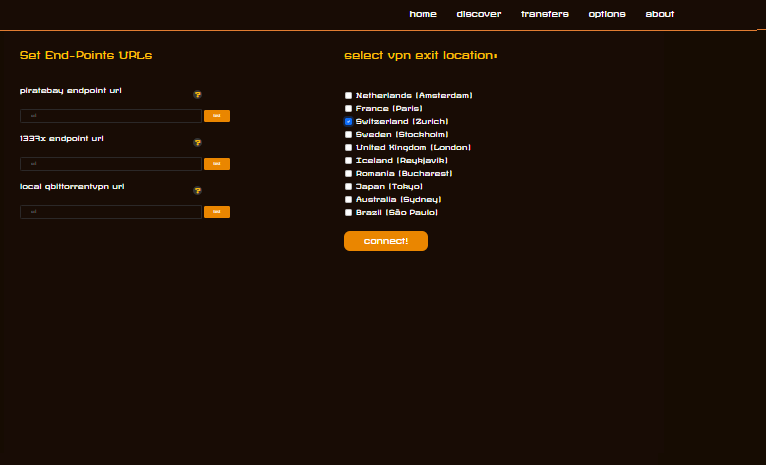
The Options page has two sections:
Set End-Point URLs — configure the proxy/mirror URLs used by each indexer:
piratebay endpoint url— the Pirate Bay mirror the scraper will hit.1337x endpoint url— reserved for future use when a compatible proxy is available.local qbittorrentvpn url— legacy field for a local qBittorrent-over-VPN instance.
Select VPN Exit Location — choose which ProtonVPN exit country/city the tunnel should connect through. Available locations:
- Netherlands (Amsterdam)
- France (Paris)
- Switzerland (Zurich) ← default
- Sweden (Stockholm)
- United Kingdom (London)
- Iceland (Reykjavik)
- Romania (Bucharest)
- Japan (Tokyo)
- Australia (Sydney)
- Brazil (São Paulo)
Select a location and click connect! to switch the VPN exit node dynamically without restarting the containers.
About
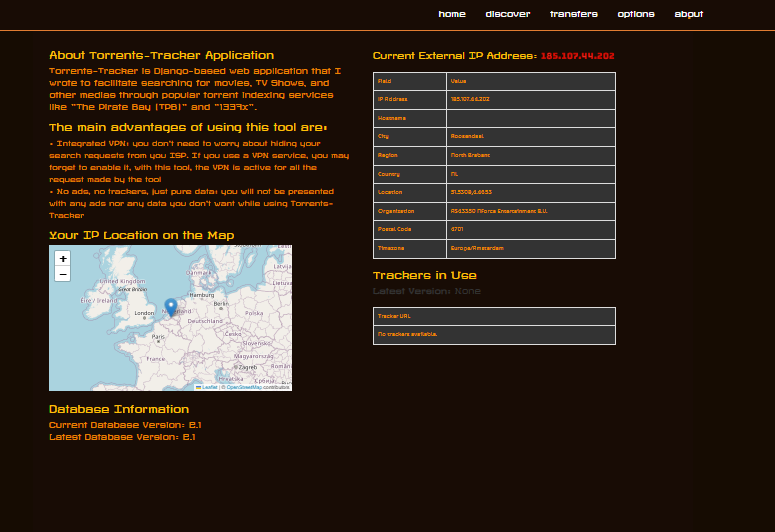
The About page provides information about the application and the current system state:
About Torrents-Tracker Application — explains the tool’s purpose: VPN-protected torrent searching and downloading without exposing your real IP, and without being served ads or trackers.
Current External IP Address — shows the public IP address currently seen by the outside world (i.e. the VPN exit IP, not your real IP). Verifies the VPN tunnel is active and working.
Your IP Location on the Map — an embedded map pins the VPN exit node’s geographic location, giving a visual confirmation of where traffic appears to originate.
Database Information — displays the current and latest database schema versions, useful for verifying migrations are up to date.
Trackers in Use — lists the torrent tracker announce URLs currently configured in Transmission.
Architecture Overview
Browser
   │
   ▼
Django app (port 7070)
   │  shares network stack
   ▼
Transmission + ProtonVPN container (transmissionvpn)
   │
   ├── Transmission RPC  :9091
   ├── Transmission Web  :7071
   └── All traffic exits via ProtonVPN tunnel (OpenVPN)
The app and Transmission run in Docker Compose. The torrents-tracker container shares the network namespace of the transmissionvpn container, so all outbound connections (scraping, torrent traffic) are automatically routed through the VPN. No split-tunnelling — if the VPN drops, traffic stops.
Downloaded files land in /mnt/datassd/Transfers/Completed. Exported content is moved to /mnt/datassd/Nouveautes.
Deployment
Use scripts/deploy-service.sh to sync the dev directory to the live service directory and rebuild/restart containers:
# Sync + rebuild + restart (default)
./scripts/deploy-service.sh

# Sync files only, no Docker operations
./scripts/deploy-service.sh --sync-only

# Rebuild image only
./scripts/deploy-service.sh --build

# Rebuild + restart
./scripts/deploy-service.sh --restart
Get the code
Important Note Do You have Issues accessing the core repository? Don’t be shy and send me an EMAIL at arsscriptum@proton.me and I will fix access for you
